Google Shopping image requirements change on 31 January. Here's the feed audit to run before Q4, not after.
Google's Merchant Center minimum product image size rises to 500x500 pixels on 31 January 2027. Here's the feed audit to run now, before Q4 closes it off.
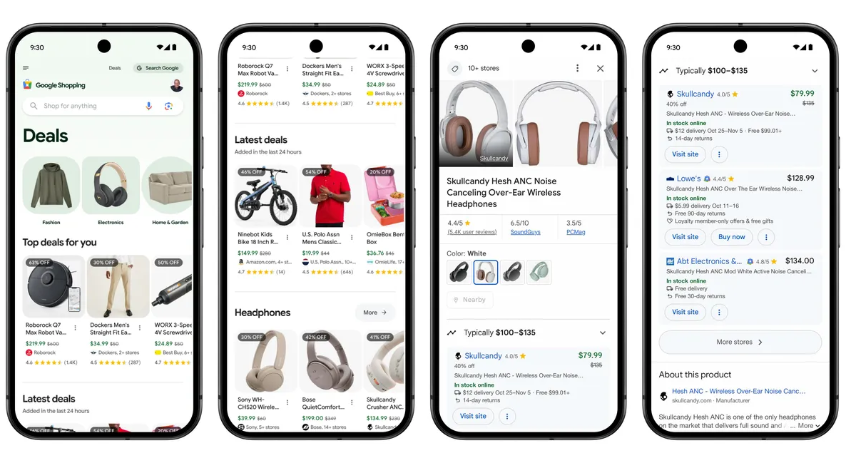
Google Shopping image requirements are changing on 31 January 2027. The minimum resolution for the [image_link] attribute rises to 500 x 500 pixels, across every product category and every marketing method. Anything below that gets the product disapproved — out of Shopping ads, out of free listings, out of Performance Max inventory.
The old floors were 100 x 100 pixels for most products and 250 x 250 for apparel, which is another way of saying they were never really a constraint. That is exactly why this one will bite. Most catalogues have been quietly non-compliant since the day they were built, and nobody has had a reason to look.
The date sounds comfortably far away. It isn't, and the reason has nothing to do with how long the fix takes.
What actually changes
- The 500 x 500 minimum applies to both [image_link] (your main product image) and [additional_image_link].
- It applies to all categories. The apparel exception at 250 x 250 disappears with everything else.
- Google recommends 1500 x 1500 or above. That is a recommendation, not the requirement — but if you are commissioning new photography anyway, shoot to the recommendation, not the floor.
- The existing ceilings are unchanged: 64 megapixels and 16MB per file.
- Merchant Center has been flagging undersized images in the "Needs attention" section since 14 April 2026, when the requirement was published in the annual product data specification update. If you have not looked at that section since April, the list is already waiting for you.
Why 31 January is a trap of a deadline
A deadline in the last week of January reads as a January job. Treat it as one and you will run this work in the worst possible month.
Product photography and retouching capacity books out from September to November for Q4 campaign work. If any part of your fix needs a camera — and for a meaningful number of SKUs it will — you are competing for that capacity right now, not in the new year. Come January you will have roughly four weeks, a supplier chasing their own backlog, and no room to discover that the source files were never archived.
Then there is the propagation problem. Feed changes need to be crawled and re-processed, and image changes in particular are not instant. You want that churn happening in a quiet month, not while peak traffic is running through the same campaigns. And a product disapproved on 1 February is a product that loses its accumulated performance history precisely as Q1 planning starts.
The honest version: this is a September job with a January deadline. Doing feed work in December is how avoidable mistakes get made.
The audit
1. Get the SKU list, not the warning count
Merchant Center will tell you how many products have an image warning. That number is close to useless on its own. Go to Diagnostics, filter to the image size issue, and export the product list. On a large catalogue, the faster route is to pull the [image_link] URLs straight from your feed and check dimensions programmatically — a spreadsheet of URLs and a short script will beat clicking through the interface on 10,000 SKUs.
2. Separate the main image problem from the additional image problem
On the main image, the consequence is unambiguous: below 500 x 500 and the product is disapproved. On additional images, the reporting disagrees with itself. Some coverage says undersized additional images also trigger disapproval; other readings of Google's guidance say they simply won't be shown. Google's own specification update page does not resolve it cleanly.
Treat the main image as a hard deadline and additional images as a strong should-fix. Do not let the ambiguity on the second one become a reason to delay work on the first.
3. Sort by revenue, not by SKU count
Not every non-compliant product deserves a re-shoot. Split the list three ways. Top-selling SKUs get fixed properly, from source imagery. Long-tail products with usable source files get batch re-exported. Long-tail products with nothing usable behind them need a decision you have probably been avoiding: is this SKU worth keeping in the feed at all? A forced catalogue audit is not the worst thing to come out of this.
4. Fix at source, not in the feed
There is a tempting shortcut here, and it is a bad one. Padding an image with white space or a border to clear the dimension check will pass the pixel test and fail the quality one — Google's image policy still prohibits added borders, watermarks and promotional overlays. Upscaling a 200 x 200 JPEG to 500 x 500 gets you a compliant, visibly soft image.
That matters more than it used to. Product imagery increasingly feeds visual surfaces and AI-generated product summaries, not just the Shopping grid. A blurry compliant image clears the deadline and quietly costs you click-through for the next three years. If the source file genuinely is 200 pixels wide, that is a re-shoot or a supplier request, not a resize.
What Google's auto-optimisation does and doesn't cover
Google has said it will automatically optimise some undersized images to meet the new
standard, flagging them in the Needs attention section. Do not plan around this. It covers an
unspecified subset, you do not control the output, and you will not know which of your
products got the treatment until after the fact. "Google upscaled it for us" is not a position you
want your best-selling products in.
What to do this week
- Export the non-compliant SKU list from Merchant Center Diagnostics — the actual list, not the count.
- Cross-reference it against the last 12 months of revenue by SKU.
- Flag every non-compliant product in your top 20% by revenue. That is your September workload, and it is almost certainly smaller than you fear.
- Get a capacity estimate from whoever handles your product photography before their Q4 calendar closes.
- If you resell rather than manufacture, request higher-resolution assets from suppliers now. That is the longest lead time in the entire job and the one most likely to be forgotten.
- Add a minimum-dimension check to whatever process onboards new SKUs, so the
backlog stops growing while you are clearing it.
FAQ
Does this affect free listings as well as paid Shopping ads?
Yes. A disapproved product drops out of both, and out of Performance Max inventory with them.
My apparel products already met a 250 x 250 minimum. Am I fine?
No. The 250 x 250 apparel floor is being replaced, not retained. Every category moves to 500 x 500.
Do I need to get everything to 1500 x 1500?
Not to comply. But if you are booking a shoot or re-exporting from source files anyway, the marginal cost of hitting the recommendation is close to zero, and it removes this problem permanently rather than until the next specification update.



23.png)